Sunday, 3 June 2012

Site to Site VPN, Remote VPN

Site to Site VPN
What is a site to site VPN? It is a VPN that allows offices in multiple fixed locations to establish secure connections with each other over a public network such as the Internet. Site-to-site VPN extends the company's network, making computer resources from one location available to employees at other locations. An example of a company that needs a site-to-site VPN is a growing corporation with dozens of branch offices around the world.
There are two types of site-to-site VPNs:

  • Intranet-based -- If a company has one or more remote locations that they wish to join in a single private network, they can create an intranet VPN to connect each separate LAN to a single WAN.
  • Extranet-based -- When a company has a close relationship with another company (such as a partner, supplier or customer), it can build an extranet VPN that connects those companies' LANs. This extranet VPN allows the companies to work together in a secure, shared network environment while preventing access to their separate Intranets.

Even though the purpose of a site-to-site VPN is different from that of a remote-access VPN, it could use some of the same software and equipment. Ideally, though, a site-to-site VPN should eliminate the need for each computer to run VPN client software as if it were on a remote-access VPN. Dedicated VPN client equipment, described later in this article, can accomplish this goal in a site-to-site VPN.


Remote VPN
What is a Remote VPN?  It is a VPN that allows individual users to establish secure connections with a remote computer network. Those users can access the secure resources on that network as if they were directly plugged in to the network's servers. An example of a company that needs a remote-access VPN is a large firm with hundreds of salespeople in the field. Another name for this type of VPN is virtual private dial-up network (VPDN), acknowledging that in its earliest form, a remote-access VPN required dialing in to a server using an analog telephone system. 

There are two components required in a remote-access VPN. The first is a network access server (NAS, usually pronounced "nazz" conversationally), also called a media gateway or a remote-access server (RAS). (Note: IT professionals also use NAS to mean network-attached storage.) A NAS might be a dedicated server, or it might be one of multiple software applications running on a shared server. It's a NAS that a user connects to from the Internet in order to use a VPN. The NAS requires that user to provide valid credentials to sign in to the VPN. To authenticate the user's credentials, the NAS uses either its own authentication process or a separate authentication server running on the network.
The other required component of remote-access VPNs is client software. In other words, employees who want to use the VPN from their computers require software on those computers that can establish and maintain a connection to the VPN. Most Operating Systems today have built-in software that can connect to remote-access VPNs, though some VPNs might require users to install a specific application instead. The client software sets up the tunneled connection to a NAS, which the user indicates by its Internet address. The software also manages the encryption required to keep the connection secure. You can read more about tunneling and encryption later in this article.
Large corporations or businesses with knowledgeable IT staff typically purchase, deploy and maintain their own remote-access VPNs. Businesses can also choose to outsource their remote-access VPN services through an enterprise service provider (ESP). The ESP sets up a NAS for the business and keeps that NAS running smoothly.


Reference:
http://computer.howstuffworks.com/vpn4.htm
http://computer.howstuffworks.com/vpn3.htm

Sunday, 27 May 2012

Public Key Infrastructure (Digital Cert )

What is a Public Key Infrastructure (PKI)? It is a set of hardware, software, people, policies, and procedures that are needed to create, manage, distribute, use, store, and revoke digital certificates.


In cryptography, PKI is an arrangement that binds public keys with respective user identities by means of a certificate authority (CA). The user identity must be unique within each CA domain.


A PKI consists of:
Certificate Authority that both issues and verifies the digital certificates.
Registration Authority that verifies the identity of users requesting information from the CA.
Central Directory
Certificate Management System


Certificate Authorities
The primary role of the CA is to digitally sign and publish the public key bound to a given user. This is done using the CA's own private key, so that trust in the user key relies on one's trust in the validity of the CA's key. The mechanism that binds keys to users is called the Registration Authority (RA), which may or may not be separate from the CA. The key-user binding is established, depending on the level of assurance the binding has, by software or under human supervision.


IPSec (ESP, AH, DES, MD5, SHA, DH)

What is IPSec? It is a set of protocols developed by IETF to support a secure exchange of packets at the IP Layer. IPSec has been deployed to implement Virtual Private Networks (VPNS).

IPSec supports two different encryption modes, one being Transport Mode and the other being Tunnel Mode. Transport Mode encrypts data portion (payload) of each packet only, but leaves the header untouched. Tunnel Mode securely encrypts both header and payload. An IPSec-compliant device will decrypt each packet.

There are different types of IPSec such as:
Encapsulating Security Payload (ESP)
Authentication Header (AH)
Data Encryption Standard (DES)
Message Digest 5 (MD5)
Secure Hash Algorithm (SHA)
Diffie-Hellman (DH)

ESP
The main job of the ESP is to provide privacy that users seek for IP datagrams encrypting them. ESP supports its own authentication scheme like that used in AH.

AH
The main job of the AH is to provide integrity authentication services to IPSec-capable devices, so they can verify that messages are received intact from other devices.

DES
DES is a widely-used method of data encryption using a private key that was judged so difficult to break by that it was restricted for exportation to other countries.

MD5
MD5 is used to check the integrity of the file content. If file is transferred using network, recipient can calculate the MD5 hash and check it with the MD5 check sum, and if both are the same, the user can be sure that file is not corrupted.

D-H
D-H is used within IKE to establish session keys.

References:
http://www.webopedia.com/TERM/I/IPsec.html
http://www.tcpipguide.com/free/t_IPSecEncapsulatingSecurityPayloadESP.htm
http://www.javvin.com/protocolAH.html
http://www.cisco.com/en/US/tech/tk583/tk372/technologies_tech_note09186a0080094203.shtml

Sunday, 20 May 2012

Authentication, Authorization and Accounting

What is Authentication, Authorization and Accounting (AAA)?
AAA is an architectural framework that configures a set of three independent security functions in a consistent manner. AAA helps to provide a modular way of performing the following services:

1) Authentication
How does Authentication help? It provides methods for identifying users, which includes log in and password dialog, challenge and response, messaging support, and depending on the security protocol you select, encryption. How Authentication works is that a user is identified prior to being allowed access to the network and network services. To configure AAA authentication, the user has to define a named list of authentication methods.

2) Authorization
How does Authorization help? It provides methods for remote access control, which includes one-time authorization or authorization for each service, per-user account list and profile, user group support, and support of IP, IPX, ARA and Telnet. How Authorization works is by assembling a set of attributes that describe what the user is authorized to perform. The attributes are compared to the information that is contained in a database for a given user, which the result will be returned to AAA to determine the user's acutal capabilities and restrictions.

3) Accounting
How does Accounting help? It provides methods for collecting and sending security server information used for billing, auditing, and reporting, such as user identities, start and stop times, executed commands such as PPP, number of packets and number of bytes. How Accounting work is that it enables the user to track the services users that are accessing as well as the amount of network resources they are consuming. The network access server reports user activity to the RADIUS or TACACS+ security server in the form of accounting records when AAA Accounting is activated.

References:
http://www.cisco.com/en/US/docs/ios/12_2/security/configuration/guide/scfaaa.html

Sunday, 13 May 2012

Access Control List

What is an Access Control List (ACL)? An ACL is a list of Access Control Entries (ACE). A trustee is identified in each ACE in an ACL, specifying the access rights allowed, audited or denied for the trustee. A securable object's Security Descriptor contains two types of ACLs: Discretionary Access Control List (DACL) and System Access Control List (SACL)

A DACL identifies trustees which are allowed or denied access to a securable object. The system will check the ACEs in a securable object's DACL when a process is trying to access the object, so as to determine the grant of access to it. When the object do not have a DACL, the system grants full access to everyone. The system will deny all attempts to access the object when the object's DACL has no ACEs, as the DACL does not allow any access rights. The system checks the ACEs in sequence until it finds the ACEs that allow all the requested access rights, or until any requested rights are denied.

A SACL enables administrators to log attempts to access a secured object. The types of access attempts by a trustee are specified by each ACE, and it causes the system to generate a record in the security event log. When an access attempt succeeds, fails or both, an ACE in a SACL can generate audit records.

References:

Sunday, 6 May 2012

Secure Perimeter Routers & Disable Services & Logging

Securing Perimeter Routers have two different ways:
Ingress Filtering
Egress Filtering

Ingress Filtering
This is a technique that ensures that incoming packets are from the network are what they claim to be from.
For Ingress Filtering to work, the network has to know the IP addresses of each network it is connected to, the network has to know what it will send.

Egress Filtering
This is a practice of restricting and monitoring the information outbound's flow potentially from one network to another.
For Egress Filtering to work, it requires administrative work and policy change when there is a new application that requires external network access.

Disable Services


1) Disable bootp Server
bootp is enabled by default. When not using, the user should disable it. You can use the no ip bootp server command in global configuration mode to disable bootp on the routers.

2) Disable DNS lookup
Domain Name System lookup is enabled by default on Cisco routers and if it is not being implemented. It is advisable to disable this feature globally by using the no ip domain-lookup command.

Logging


What is logging? It is the process of using a computer to collect data through sensors, analyzing the data and save and output the results of the collection and analysis. It is commonly used in scientific experiments and in monitoring system where there is the need to collect information faster than anything that can collect information.

References:
http://www.debianadmin.com/securing-cisco-routers-by-disabling-unused-services.html
http://www.webopedia.com/TERM/D/data_logging.html

Common Threats to Router and Switch Physical & Mitigation

There are four types of threats involved during Physical Installations:
Hardware Threats
Electrical Threats
Environmental Threats
Maintenance Threats

Hardware Threats
What are Hardware Threats? It involves threats that bring physical damage to the router or switch.

Mitigations for Hardware Threats:
In the wiring closets or computer or telecommunications rooms, there should be Mission-critical Cisco network equipment that meet some requirements. Such requirements are that the room must be locked with only authorised personnel allowed access, the room should not accessible in any way possible apart from the secured access point, the room should use electronic access control with all entry attempts logged by security systems and monitored by a security personnel.

Electrical Threats
What is a Electrical Threat? It includes irregular fluctuations in voltage, such as brownouts and voltages spikes.

Mitigations for Electrical Threats
Electrical Threats can be limited by adhering to some guidelines:
1) Install Uninterruptible power supply (UPS) systems for Mission-critical Cisco network devices
2) Install back up generator systems for Mission-critical supplies
3) Install redundant power supplies on critical devices

Environmental Threats
What are Environmental Threats? It includes very low or high temperatures, moisture, electrostatic, and magnetic Interference Environmental threats, such as temperature extremes or humidity extremes.

Mitigations for Environmental Threats
To limit environmental damage to Cisco network devices, the following actions can be taken:
1) Supply the room with dependable temperature and humidity control system.
2) Remove any sources of electrostatic and magnetic interference in the room

Maintenance Threats
What is Maintenance threats? It includes not having back up parts or components for critical network components; not labeling the components and the cabling correctly. It also includes poor handling of key electronic components, electrostatic discharge, poor cabling, poor labeling, and so on.

Mitigations for Maintenance Threats
To prevent maintenance-related threats, follow the general rules:
1) Clearly label all equipment cabling and secure the cabling to equipment racks to prevent accidental damage, disconnection or incorrect termination
2) Use cable runs, raceways, or both to traverse rack-to-ceiling or rack-to-rack connections
3) Maintain a stock of critical spares for emergency use

Reference:
http://computernetworkingnotes.com/network-security-access-lists-standards-and-extended/mitigating-common-threats.html

Network / Port Address Translation

Network Address Translation
What is Network Address Translation (NAT) ? It is an Internet standard that enables Local-Area Networks (LAN) to use a set of IP addresses for internal traffic and another set of addresses for the external traffic. NAT serves three purposes: Providing a type of firewall by hiding internal IP addresses, enabling a company to be able to use more internal IP addresses and allow a company to combine many ISDN connections into a single Internet connection.

Since there are many users using the Internet, IP addresses have to be used and the number of available IP Addresses is not enough. One solution is to redesign the address format to allow more possible addresses, however it will take years to implement this as it needs modification and the whole infrastructure of the Internet. NAT allows single devices like routers to act as an agent between the public network and the local network, which also means only a single, unique IP address is needed to represent a whole group of computers.

Port Address Translation
What is Port Address Translation (PAT) ? It is an extension to the NAT that permits many different devices on a LAN to be mapped to a single public IP Address. The purpose of the PAT is to conserve IP Addresses. PAT is used in most home networks.

In one scenario, the Internet Service Provider (ISP) assigns one IP Address to a home network's router. When Computer 1 logs on the internet, the router would assign a port number to the client, which is appended to the Internal IP Address.It gives Computer 1 a unique address. When Computer 2 logs on the internet at the same moment, the router will know which computer to send specific packets to as each computer has their own unique Internal Address.


References:
http://www.webopedia.com/TERM/N/NAT.html
http://www.howstuffworks.com/nat.htm
http://searchnetworking.techtarget.com/definition/Port-Address-Translation-PAT

Perimeter Router, Internal Router and Firewall

Perimeter Router
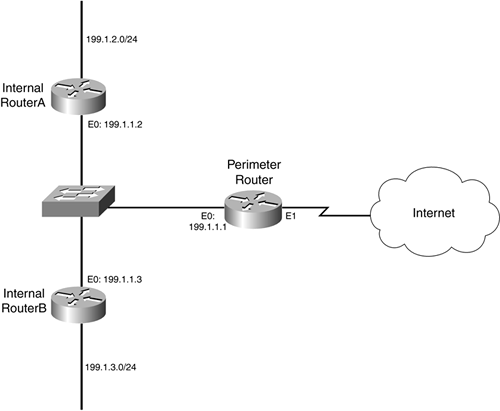
What is a Perimeter Router? It is a standard router that provides a serials connection to the internet. It is also a LAN connection to the internal network. To be able to implement basic security for the Demilitarised Zone (DMZ) and implement preliminary filtering for the internal network, the perimeter router should provide filtering of the outside traffic. As an additional security option, the router could run the firewall feature.

Diagram 1

Internal Router
What is a Internal Router? It is a router that has Open Shortest Path First (OSPF) neighbor relationships with interfaces within the same area. In a single area, it has all its interfaces.

Firewall
What is a firewall? It is a set of related programs that protects the resources of a private network from users from other networks. It is located at a network gateway servers. A firewall examines each network packet, determining whether it can be forwarded towards its destination or not. Firewalls works with a proxy server that can make network requests on behalf of workstation users. In a specially designed computer separate from the rest of the network, a firewall is often installed so no incoming requests will be able to get directly at the private network resources.

Diagram 2

Reference:
http://etutorials.org/Networking/Cisco+Certified+Security+Professional+Certification/Part+II+Securing+the+Network+Perimeter/Chapter+5+Securing+Cisco+Perimeter+Routers/Perimeter+Router+Terms+and+Concepts/
http://searchsecurity.techtarget.com/definition/firewall

Diagram 1:
http://etutorials.org/shared/images/tutorials/tutorial_56/15fig01.gif

Diagram 2:
http://upload.wikimedia.org/wikipedia/commons/thumb/5/5b/Firewall.png/300px-Firewall.png

Sunday, 29 April 2012

Security Policy

What is a Network Security Policy? It is a policy intended to protect a network's integrity and to mitigate the losses as well as the risks which are associated with security threats to the network and its resources. Without Network Security Policy, a user's network availability could be easily compromised. A Network Security Policy starts with assessing the risk to the network and building a response team. Implementing a security change management practice and network monitoring for security violations are required in the continuation of a Network Security Policy.

Some aspects of a Network Security Policy are:
a) The Network Security Policy must be understandable
Users who read the policy must be able to comply with it easily. Ensuring that the policy is understandable will help the users understand it better.

b) The Network Security Policy must be consistent
If the policy is not consistent, it may raise discontent among the user community. An example would be making a decision in one issue and changing the decision again a few weeks later.

c) The Network Security Policy must be enforceable
If a user were to violate one of the policies, without punishing the user, the policy would be useless. So the management has to enforce the policy by punishing those who violate the terms and conditions of the policy.

d) The Network Security Policy must be documented, distributed, and communicated properly
If the policy is not documented, distributed nor communicated, enforcing a policy that no user has read would mean that only the one who created the policy would enforce it. So having new hires to sign a copy as they join the organisation would help enforce the policy.

e) The Network Security Policy needs to be flexible
Policies would surely experience changes as the business changes, and the management will need to stay on top of the policy.

f) The Network Security Policy must be reviewed
Implementing a regular review of the policies would ensure that they do not become obsolete. Months after the policy has been created, it is possible for the policy to become obsolete as the company changes its business relationship.

g) The Network Security Policy must be realisticIf the policies are too restrictive, complaints would arise, and the management will not help with the back up as the policies are unrealistic.

Examples of Network Security Policies:

1) Virtual Private Network Policy

2) Acceptable Encryption Policy

3) Information Sensitivity Policy

4) Password Policy

5) Wireless Communication Policy


References:
http://www.utoronto.ca/security/documentation/policies/policy_5.htm
http://www.cpcstech.com/sample-network-computer-security-policies.htm
http://www.windowsecurity.com/articles/Defining_a_Security_Policy.html


Common Networking Attack Threats and Solutions

What is a network attack? It is defined as attempting to compromise network security using any means, method or process. Having compromised the network security, the attacker is able to run codes to damage systems or corrupt data, use user accounts and privileges illegally,or some other malicious activities. These are Network Attack Threats.

There are many different Network Attack Threats, but there are the more common Network Attack Threats such as:

1) IP Address spoofing

The IP Address of a computer is used by most networks and operating systems to identify a valid entry. And it is possible for IP Addresses to be falsely assumed with IP Address Spoofing. Special programs are used by attackers to change into IP packets that seems to have originated from valid addresses inside the corporate intranet. Once the attacker has successfully gained access to the network with a valid IP Address, he/she will be able to modify or delete data, or even change the route of the data.


Picture of how spoofing is done

2) Denial-of-Service Attack (DOS Attack)

The Denial-of-Service Attack (DOS Attack) prevents normal use of network and the computer by valid users. Once the attacker has gained access to your network, the attack is able to:

 a) Randomise the Internal Information Systems staff's attention so that they will not see the intrusion immediately, which allows the attacker to initiate more attacks during this diversion.

b) Flood one computer or the whole network with traffic until a shut down occurs due to overloading.

c) Block traffic, which will result in the loss of access to network resources by authorised users.


But, there are solutions to solve or counter the problems caused by the Network Attack Threats.
For IP Address spoofing, users can trace the spoofed IP Packets, and so IP trace-back technology play a big part in discovering the source of the spoofed packets. The two main methods for tracing spoofed IP packets back to the source is Hop-by-Hop trace back and logging of suspicious packets in routers. It can inform the Internet Service Provider (ISP) when a node detects that it has become a victim of a flood attack. During flood attacks, the ISP can determine which router is sending the stream to the victim, and then it can also determine which is the next router that is going to be the next victim. So the ISP would either reach the source of the flood attack or reach the end of its administrative domain.

For DOS attacks, users can use the pattern recognition web application security engine to effectively protect against malicious behavior such as DOS attack. The patterns are regular expression-based and designed to efficiently and accurately identify a wide variety of application-level attack methods.


References:
http://www.tech-faq.com/network-attacks.html
http://technet.microsoft.com/en-us/library/cc959354.aspx
http://www.applicure.com/solutions/prevent-denial-of-service-attacks
http://www.cisco.com/web/about/ac123/ac147/archived_issues/ipj_10-4/104_ip-spoofing.html

Picture :
http://www.windowsecurity.com/img/upl/ssh1_21026823126250.gif